

From time-to-time you may want to place a pause on referrals coming into your organisation. For example, when doing some system maintenance you might want us to stop sending referrals to you until the maintenance is completed.
The Referral Pause function allows you to do just this.
How do I pause referrals?
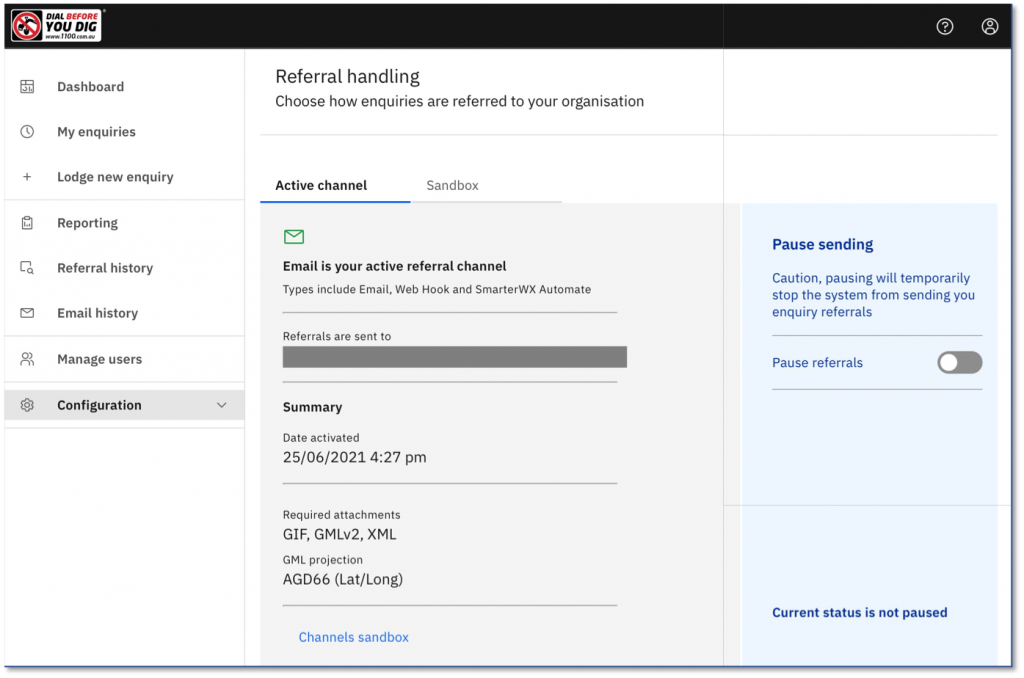
- Go to the Configuration > Referral handling option on the main menu.
- Toggle the Pause referrals option.
An email is sent to your organisation’s administrator when the referral handling is paused or un-paused.
What happens to paused referrals?
When your referral channel is paused, all referrals for your organisation are held in a queue to be released later. You can see a count of the number of referrals in the paused queue by returning to the Configuration > Referral handling page.
From an enquirer’s perspective, there is no difference. The enquirer will still see that their enquirer has been referred to your organisation and the enquirer will still expect to receive a response from you before they can proceed with their works.
How do I release my paused referrals?
Once you are ready to start processing referrals again, return to the Configuration > Referral handling page and turn off the Pause referrals toggle. SmarterWX Sentinel will start to send the queued referrals.
- Paused referrals are released in blocks every minute.
- The number of referrals released in each minute may vary but is typically around 10-12 per minute.
- Newly lodged enquiries are still sent to you immediately – they do not wait in the queue to be sent.
Can I let enquirers know there will be a delay?
The pause function is designed to be used for a short period of time, such as a few hours whilst you perform system maintenance. In these cases it should not be necessary to let the enquirers know about the delay. You should still be responding in a reasonable time frame.
If your outage is expected to be longer than this, you should discuss this with the BYDA Helpdesk or your BYDA account manager. In exceptional circumstances, a notification can be displayed within the website to let users know to expect a delay in your responses.
Can I change my referral handling settings during the pause?
Referrals that have been added to the pause queue will be sent using the same settings that were in place when the enquiry was lodged.
If you need to change your settings prior to resuming processing, contact the BYDA Helpdesk. We can help you to retrospectively apply the settings to paused referrals.